ColdFusion Plays Well With Others: Integrating Modern APIs with Legacy Systems
ColdFusion Plays Well With Others: Integrating Modern APIs with Legacy Systems
What do you do when you have an older ColdFusion-based application that is still working flawlessly, but you want to integrate it with a service that doesn’t provide ColdFusion integration instructions or sample code? If you have your own development team, you can task someone with reading the API documentation for the service and then creating the code to fully integrate it. If you are a small business without your own development team, a limited budget, and you utilize a hosting provider for your site, this can quickly become an expensive prospect.
This is where ColdFusion shows one of its key strengths compared to other languages: interoperability and flexibility when integrating with modern APIs and services. ColdFusion provides several reliable ways to integrate legacy applications with modern APIs without requiring a full system rewrite.
ColdFusion API Integration Overview
ColdFusion applications can integrate with modern APIs and external services even when native ColdFusion libraries are not available. Common integration approaches include:
- Java Libraries – leveraging ColdFusion’s native JVM foundation to access Java-based APIs
- JVM Language Integrations – running other JVM-compatible languages when Java libraries are unavailable
- cfexecute – executing external scripts or command-line tools such as Python programs
- JavaScript API Integrations – communicating with external services using browser-based or AJAX API calls
These methods allow legacy ColdFusion applications to remain stable while still integrating with modern platforms and services.
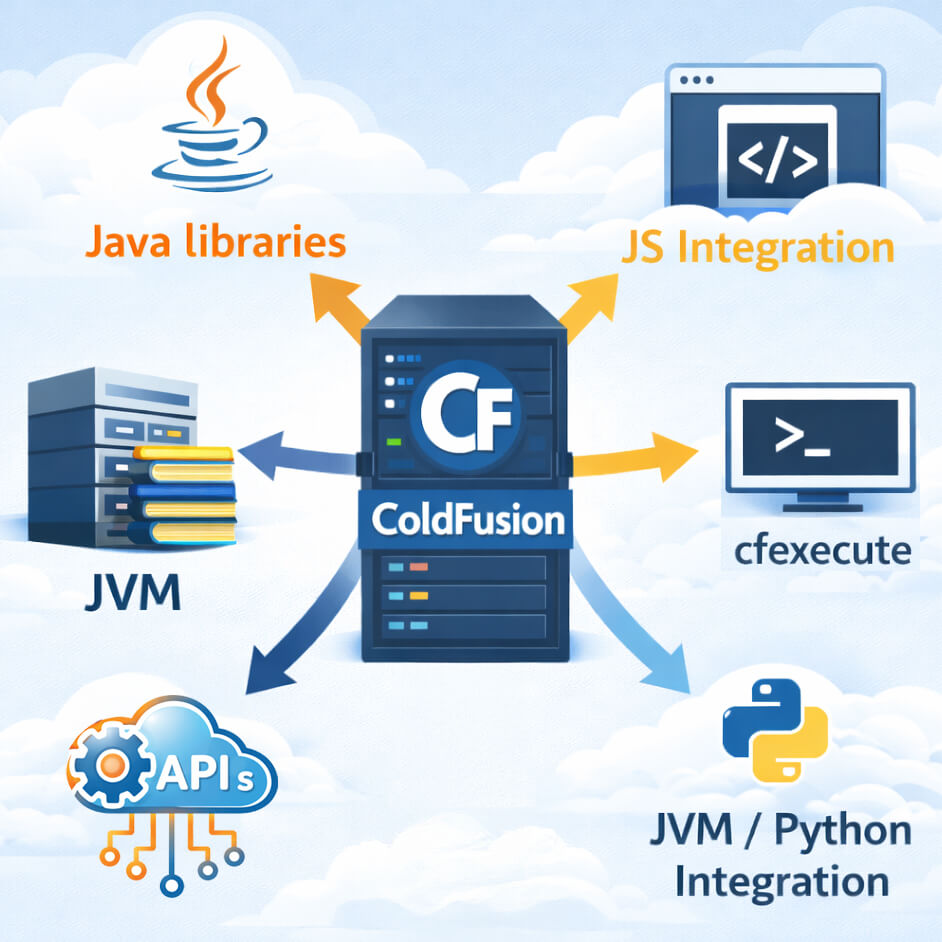
ColdFusion Integration Options
ColdFusion runs on top of Java, so one option is to use a Java library that provides the API integration and then access the library within your application. This option could require a significant amount of development time depending on how the library must be loaded. There are also plenty of Java Virtual Machine (JVM)-based projects designed to run other languages, but some of those can become obsolete or unsupported over time. Other integration approaches include running external programs using cfexecute, or using the API’s JavaScript integration guide to send and receive data between your application and the service.
Integrating ColdFusion Using Java Libraries
ColdFusion makes it easy to call Java libraries and access their functionality directly. Many projects created over the years extend ColdFusion functionality simply by accessing a Java library. This is essentially what ColdFusion does at its core.
Advantages
- Tight integration with your application
- Direct access to the large Java ecosystem
- Reliable and well-supported JVM environment
Potential Drawbacks
- Integration may require significant development time
- Some libraries may have limited documentation
There also used to be a limitation when the Java library required supporting libraries to be loaded at the same time. With ColdFusion 2025, you are now able to load more than one library simultaneously. This makes it much easier to integrate complex Java projects into a ColdFusion application.
Using JVM Language Integrations with ColdFusion
Loading a third-party JVM implementation of another language can also provide the functionality you need while keeping the integration tightly connected to your application.
This can be an ideal solution when:
- There is not a Java version of the solution you are trying to integrate
- The Java version is not as feature complete
Potential Drawbacks
Some JVM implementations are not based on the most current version of the language. A good example is the Python JVM library, which is based on Python 2, a version that has been deprecated and replaced by Python 3.
Another concern when using open-source libraries integrated into your core system is the potential for security vulnerabilities. This was seen recently with the Notepad++ and NodeJS projects, where compromised versions were briefly used in production environments before being identified and fixed. Integration cost is another factor, as implementing a JVM language solution can require more development time than using cfexecute or a native solution.
Using CFexecute for External Integrations
Cfexecute has been a feature in ColdFusion since version 4.5 and has been widely discussed over the years. For readers unfamiliar with this function, it allows your application to run any program that can be executed from the system command line. The output from that program can then be returned to your ColdFusion application.
For example, I have used cfexecute to run a text-parsing program that converts a flat file into SQL or CSV formatted data. Instead of spending hours writing a ColdFusion solution, I was able to follow the program’s documentation and quickly convert flat-file data into a usable format. The results were returned to the application, allowing me to verify the output before processing the data.
Advantages
- Allows execution of external programs
- Supports any code that can be run via Command Line
- Very useful for data processing tasks
For instance, if the solution you want to use runs on Python 3 but there is no JVM implementation available, you can create a command-line script that uses Python to run the solution.
Limitations
- Limited communication between the ColdFusion application and the external program
- Security risks if third-party code is not properly verified
As with any external integration, it is important to ensure the version of the software you are running has not been compromised.
JavaScript API Integrations with ColdFusion
Many API services provide JavaScript integration guides and examples. In some cases, this can be enough to get your ColdFusion application communicating with the service. However, you still need to pass data from your application to JavaScript before sending it to the API. Managing this while maintaining user session state can increase project complexity.
Options for Passing Data
One option is using a JavaScript library that allows reading and writing to the cookie scope, which ColdFusion applications can access natively.
However:
- Cookies have limited storage capacity
- Users can potentially modify cookie data
Because of this, cookie-based communication should only be used for simple data that is validated server-side.
Another option is to create your own API for the application and access it via JavaScript using AJAX calls.
Considerations
- Requires additional development work
- APIs must be properly secured
- Access controls and validation must be implemented
Conclusion: Extending the Life of ColdFusion Applications
Deciding which integration solution to pursue depends largely on your needs, budget, and access to skilled developers. When choosing an approach, there is always a risk of introducing technical debt that can create additional costs later. Performing a proper assessment of the problem you are solving is the most important step before selecting an integration method.
One of the strengths of ColdFusion is that applications created one or even two decades ago can continue running flawlessly on modern servers. You cannot say the same for many Python 2 or older .NET applications written ten years ago. Once you evaluate the options available, you should have a clear understanding of which approach will work best for your situation.
At WRIS, we frequently help organizations extend the life of their ColdFusion applications by implementing modern API integrations and modernization strategies.
Written by Reuben Brown, Senior ColdFusion Developer at WRIS Web Services
With years of experience troubleshooting and optimizing ColdFusion applications, Reuben brings deep technical insight and practical solutions to complex web challenges.
Frequently Asked Questions
Can ColdFusion integrate with modern APIs?
Yes. ColdFusion applications can integrate with modern APIs using Java libraries, REST APIs, JavaScript integrations, JVM language tools, or external scripts through cfexecute.
Can legacy ColdFusion applications still run on modern infrastructure?
Yes. One of ColdFusion’s key strengths is its ability to run legacy applications reliably on modern servers without requiring a full rewrite. Some minor adjustments may be required in the code to run on modern servers.
What is cfexecute used for in ColdFusion?
Cfexecute allows a ColdFusion application to run external command-line programs and capture their output for use within the application.
Related Blogs
Before Google: The Wild West of Early Search Engines

WRIS at Adobe ColdFusion Summit 2026: Innovation, AI, and Community
.jpg&w=640&h=360&c=center)
What ADA Compliance Actually Means for Your Website in 2026
.jpg&w=640&h=360&c=center)